
This blog will focus on what computer hardware (such as a CPU, SSD, HDD, GPU, etc.) for you, the reader’s, budget. Whether if your budget is $800, $2000, or even as high as $10000, there are many peripherals and parts that are best for your specific budget. Let’s get started with the lowest budget I think is possible for a PC build.
$500 Budget
For a $500 budget, a desktop computer is miles away from what you’re trying to obtain. Instead, get a sustainable, everyday laptop for your needs. If you want extra peripherals such as headphones, a mouse, and a webcam, you must get a ChromeBook if you want some decent running. If you’re fine with the laptop itself, then get a Windows laptop with at least 8 gigabytes (GB) of RAM (Random-Access Memory), as well as 128 GB of storage. I would also try to get an Intel i3 or Ryzen 3 CPU minimum as anything lower may not be fast enough. Now let’s go into the budgets where desktop PCs can be manageable.
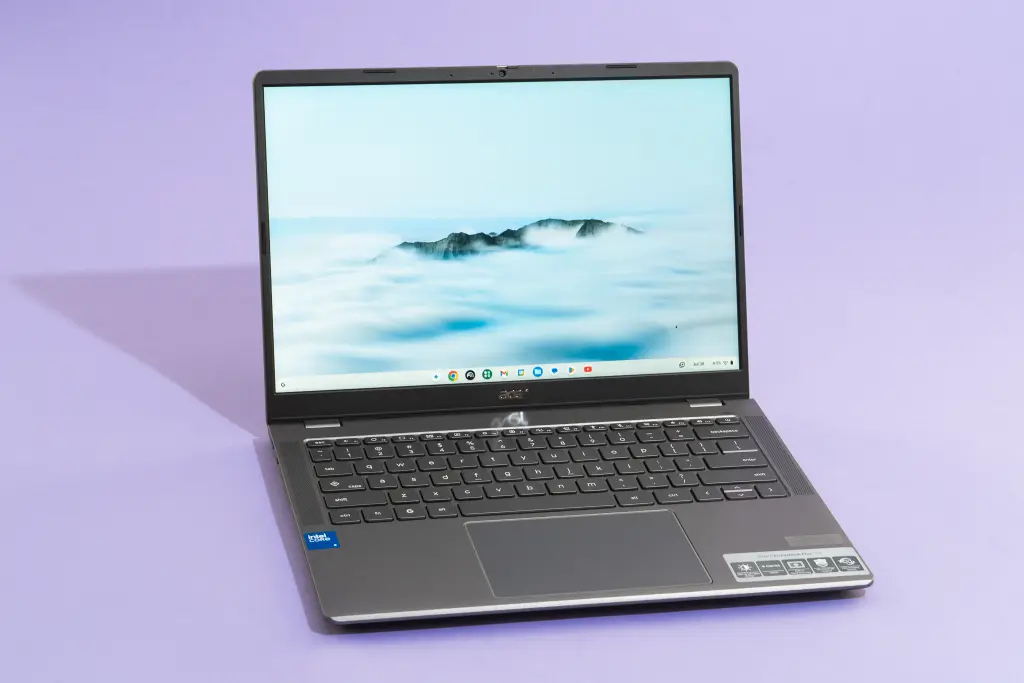
Image of a standard Chromebook
$1000 Budget
For a lower desktop PC budget, I recommend NOT getting NVIDIA GPUs (such as RTX, GTX, etc). Instead, get Radeon RX Series GPUs, such as a Radeon RX 580, which is enough to run games even on Unreal Engine 5, despite its release in 2017. The best part? It’s only $100 for a unit with 8GB GDDR5 (Graphics Double Data Rate) of VRAM (Video Random-Access Memory).
Things to Know About RAM
Before I go any further, let’s have a quick discussion about RAM. We know what RAM stands for (Random-Access Memory), but what does it do? RAM is basically how much and how fast your device can process certain actions. The more RAM you have (in terms of GB), the more individual processes that can be made, and the faster the DDR (Double Data Rate), the faster the processes are made. DDR1 and 2 aren’t used in the present day, as the process speeds for both are lower than most CPUs ‘ base speed. DDR3 is mainly used for the slowest CPUs, such as Intel Celeron, whereas DDR4 and 5 are used for your everyday needs. Now back to the budget.
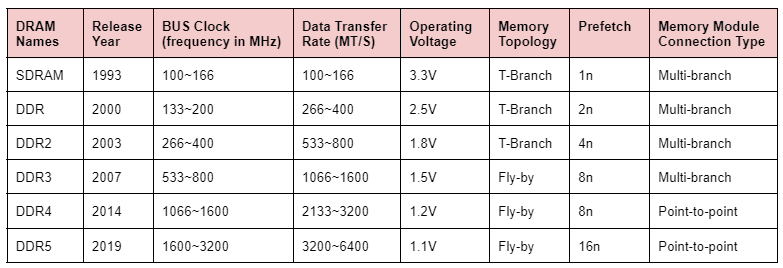
Speeds of the different types of DDR (and SDRAM, very outdated)
$1000 Budget (Continued)
Now that we’re out of the RAM section, let’s go into motherboards and CPUs for your budget. If you don’t have a motherboard, try to get one that has WiFi and Bluetooth if you plan to not use Ethernet; however, if you expect to use Ethernet, a Bluetooth motherboard works just as fine. Motherboards range in price, but most of the basic ones you’ll need cost about $200. For CPUs, either get an Intel i3/5 12th Gen or Ryzen 5 4500, as they’re both a 3.3 GigaHertz (3.3 GHz) minimum clock speed CPUs for as little as $110. For RAM, I recommend getting at LEAST 16GB of DDR4/5, which can cost anywhere from $40-100 (brands are niche; purchase whatever brand has high ratings). Finally, power supplies with the case; PSUs (Power Supply Units) are what power the PC, and for starter builds, 600W (Watts) works just fine, and for the case, get one that fits all your parts but not one that is super large. 600W PSUs cost around $40, whereas a mid-tower PC case will run you about $100. Altogether, the price of this PC costs (at most) is about $700 without delivery fees (otherwise, about $800). With the remaining $200, you can get cheap peripherals such as headphones, a keyboard, a mouse, and, if you go cheap enough, a microphone.
Quick Side Note
This blog (for now) only consists of a $500 budget and $1000 budget for a custom PC build. I will attempt to extend this blog to see a $2000 budget, $3000, and other budget sizes.